Backlink Types: What Each One Is and What It Does
The same link can be described four different ways by four different people, and only one of those descriptions is written anywhere a search engine can read it. Everything else is vocabulary we use among ourselves.
Most lists of the types of backlinks are lists of the first kind. This page separates them: the
names, which describe how a link was obtained, and the rel attribute, which is the part that is
actually in the HTML.
The only distinction search engines act on#
There are four states a link can be in, and three of them are set by one attribute.
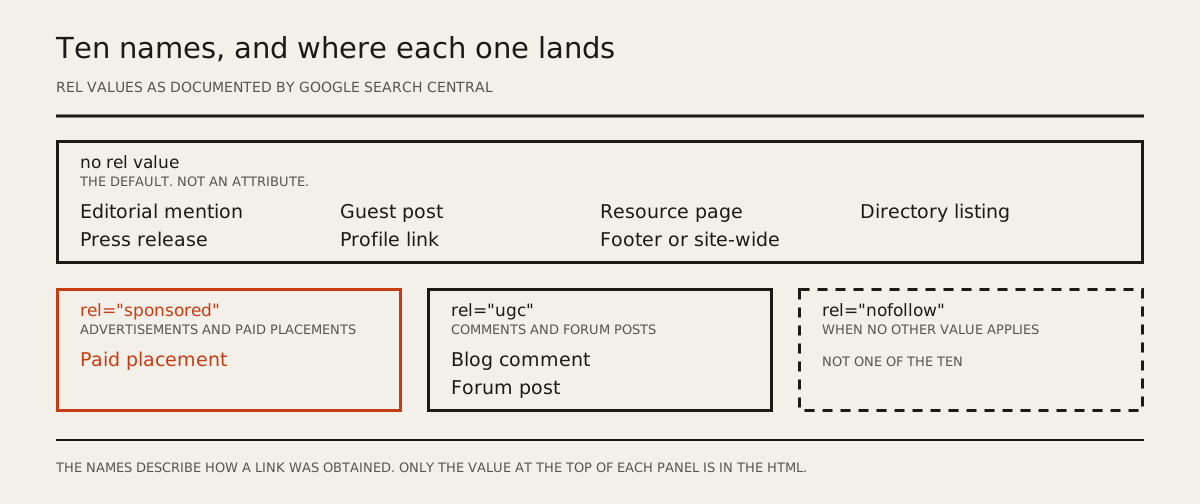
Google's own guidance covers all of them on one page, and it is worth reading rather than reading about (Qualify your outbound links to Google).
rel="sponsored"#
Google's instruction: "Mark links that are advertisements or paid placements (commonly called paid
links) with the sponsored value."
This is the sponsored link attribute, introduced alongside ugc in 2019 to replace the blanket use
of nofollow. Google notes that nofollow "was previously recommended for these types of links and
is still an acceptable way to flag them, though sponsored is preferred." If you run affiliate
links, paid reviews or advertising, this is the value for them.
rel="ugc"#
Google's instruction: "We recommend marking user-generated content (UGC) links, such as comments and
forum posts, with the ugc value."
There is a nuance most explanations drop. Google adds that "if you want to recognize and reward
trustworthy contributors, you might remove this attribute from links posted by members or users who
have consistently made high-quality contributions over time." So ugc is not a permanent property
of the comment section. It is a default you are allowed to lift for people who have earned it.
rel="nofollow"#
Google's instruction: "Use the nofollow value when other values don't apply, and you'd rather
Google not associate your site with, or crawl the linked page from, your site."
Read that ordering carefully, because it inverts what most people assume. nofollow is not the
general-purpose marker with sponsored and ugc as special cases. It is the leftover, for links
that are neither advertising nor user-generated and that you still do not want to endorse.
Here is the sentence that almost every glossary gets wrong. Google says: "Links marked with these
rel attributes will generally not be followed. Remember that the linked pages may be found through
other means, such as sitemaps or links from other sites, and thus they may still be crawled."
Generally not followed is not the same as ignored, and not followed is not the same as not crawled. A page you nofollow can still be found, crawled and indexed by another route entirely.
Plain links, and what "dofollow" means#
Nothing. There is no rel="dofollow", there never was, and you will not find it in Google's
documentation. A "dofollow" link is a link with none of the three values above, which is the default
state of every <a href> ever written.
The word survives because we needed something to call the opposite of nofollow. It is a useful piece of shorthand and a bad piece of technical vocabulary, and it is worth knowing which of those two it is when you read a report that counts them.
You can also combine values. Google: "You may specify multiple rel values as a space- or
comma-separated list." So rel="ugc nofollow" is valid and means both things.
Backlink types by where the link sits#
These names describe position on the page, not anything in the markup. They matter because position is a reasonable proxy for whether a human put the link there deliberately.
| Where it sits | Do you control it |
|---|---|
| Inside the body of an article | No. The publisher decides |
| In an author bio | Partly. You often write the bio |
| In a comment or forum post | You place it; the platform sets the attribute |
| In a footer or site-wide element | No, and repeated across every page |
| In a directory or profile listing | You place it |
| In an advertisement or paid placement | You agree it; the publisher marks it |
Only two of those six carry an attribute of their own. A comment or forum link is normally marked
ugc, by the platform rather than by you, and an advertisement or paid placement is marked
sponsored. The other four carry nothing at all, because nothing in Google's documentation assigns
an attribute to a body link, an author bio, a footer or a directory listing. That is the part worth
taking from the list: most of the names we use have no counterpart in the HTML.
Backlink types by how the link was obtained#
This is the categorisation Google's own policies care about, and it is the one with consequences. The spam policies for Google web search have a section headed link spam, and these are its examples in Google's words rather than ours:
"Exchanging money for links, or posts that contain links"
"Exchanging goods or services for links"
"Excessive link exchanges ('Link to me and I'll link to you') or partner pages exclusively for the sake of cross-linking"
"Advertorials or native advertising where payment is received for articles that include links that pass ranking credit, or links with optimized anchor text in articles, guest posts, or press releases distributed on other sites"
The same section also lists automated link creation, requiring links in contracts, low-quality
directory links, keyword-rich hidden links in widgets and forum comment spam. And it states that
buying and selling links for legitimate advertising purposes is acceptable when those links carry
rel="nofollow" or rel="sponsored".
Read that list next to the previous section and the pattern is clear. Google's policies are indifferent to what a link is called and interested in how it was obtained and whether that was disclosed. The same guest post is fine or not depending on whether money changed hands and whether the resulting link carries an attribute saying so.
Which is why the honest way to describe a link is not "dofollow from DR 60". It is whether an editor read something, decided it was worth referencing, and linked to it.
What is a backlink profile#
Your backlink profile is every link pointing at your site, taken together, described by a handful of
properties: which domains link to you and how many distinct ones there are, what the anchor text
says, where on the page the links sit, what rel values they carry, and which of them are still
live.
The distinct-domains count matters more than the link count. Fifty links from one site is one relationship; fifty links from fifty sites is fifty. Most tools report both and it is easy to read the wrong one.
There is no published ratio you are supposed to hit, and any specific target you are given was invented. What you can check without inventing anything: whether the count of distinct linking domains is going up, whether the anchors read like something a person would write, and whether the links are still there.
What happens to these over time#
The last property in that list is the one nobody tracks, and it changes more than the others.
Ahrefs studied 2,062,173 websites and the links pointing at them since January 2013. At least 66.5% of those links had rotted, and counting temporary crawl errors and other issues, the total they treat as lost reaches 74.5% (Ahrefs link rot study, February 2024). We wrote about that and the rest of the numbers in link building statistics.
The subtler version of the same problem is the one this article is really about: a link does not
have to disappear to change. Somebody edits the page, a plugin default changes, an editor applies a
new sponsorship policy, and a plain link quietly becomes rel="nofollow". It still resolves, a
reader still sees it, and nothing tells you. That is why the attribute is worth
re-checking on a schedule rather than at the moment of publication, and why
what gets agreed before publication is worth writing down.
Sources#
Both checked 15 August 2026.
- Google Search Central, Qualify your outbound links to Google
- Google Search Central, Spam policies for Google web search
- Ahrefs, link rot study, February 2024, 2,062,173 websites